
Technical Audit
Finds SEO/GEO issues that prevent proper indexing and ranking
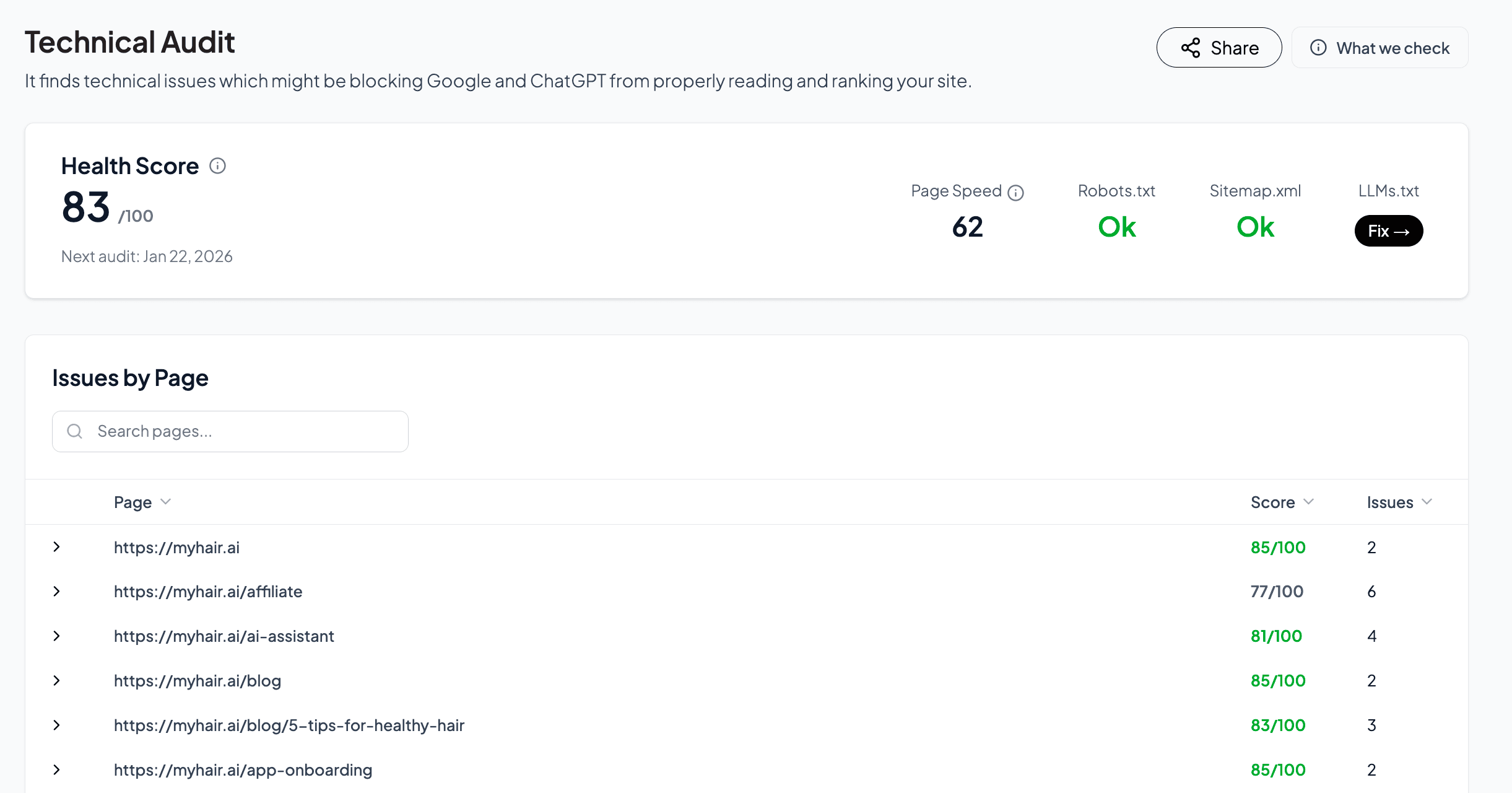
The Technical Audit finds issues that might be blocking Google and AI systems like ChatGPT from properly reading and ranking your site. Run audits regularly to catch problems before they impact your visibility.
What We Checkv
LLMs.txt: Verifies if llms.txt is present and contains correct information for AI crawlers.
JSON-LD Schema: Validates structured data so search engines understand your content.
Robots.txt: Checks for proper configuration allowing search engines to crawl your site.
Sitemap: Validates sitemap.xml presence and structure for efficient indexing.
SSL Certificate: Ensures HTTPS is properly configured for security and rankings.
Meta Title: Validates length, uniqueness, and relevance of page titles.
Meta Description: Checks description length, uniqueness, and relevance.
Broken Links: Identifies broken internal and external links hurting user experience.
Image Optimization: Checks image sizes, alt text, and formats for performance.
Page Speed: Analyzes Core Web Vitals and overall performance metrics.
Understanding Your Health Scorev
Your health score is a percentage representing your site's overall technical SEO health.
90 to 100 percent: Excellent. Minimal issues detected.
70 to 89 percent: Good. Some improvements needed.
50 to 69 percent: Fair. Several issues to address.
Below 50 percent: Needs significant attention.
Aim for 80 percent or higher for optimal SEO performance. A perfect score is not always necessary.
Issue Priority Levelsv
Critical (Red): Issues that significantly impact SEO and must be fixed immediately.
Warning (Yellow): Issues that should be addressed soon.
Notice (Blue): Minor optimizations that can improve performance over time.
Each issue includes step-by-step guidance explaining what it means, why it matters, and how to fix it.
Common Issues and Fixesv
A file that tells AI crawlers how to access your content. Create an llms.txt file in your root directory with information about your site structure and content.
A file that helps search engines discover all your pages. Generate a sitemap.xml file and submit it to Google Search Console.
Structured data that helps search engines understand your content type. Validate your schema using Google Rich Results Test and fix any syntax errors or missing required fields.
Your robots.txt may be preventing search engines from accessing important pages. Review the file and ensure you are not blocking pages you want indexed.
Your site may have an expired, misconfigured, or missing SSL certificate. Ensure HTTPS is enabled and the certificate is valid. Mixed content warnings should also be resolved.
Titles may be too long, too short, duplicated across pages, or not relevant to page content. Keep titles between 50 and 60 characters, make each page title unique, and include your primary keyword naturally.
Descriptions may be missing, duplicated, too long, or not compelling. Write unique descriptions between 120 and 160 characters for each page. Include relevant keywords and a clear value proposition to improve click-through rates.
Links that return 404 errors or do not work. Update or remove broken links and use redirects for content that has moved.
Images without descriptive alt attributes hurt accessibility and SEO. Add descriptive alt text to all images that explains what the image shows.
Pages that take too long to load negatively impact user experience and rankings. Optimize images, enable browser caching, minimize JavaScript, and consider using a CDN.
Images that are not optimized slow down your pages. Compress images, use modern formats like WebP, and serve appropriately sized images for different devices.
Without canonical tags, search engines may index duplicate versions of your pages. Add canonical tags to specify the preferred URL for each page.
Best Practicesv
Fix critical issues immediately. Do not let them accumulate.
Document your fixes. Track what you have changed and when.
Monitor trends. Watch for recurring issues that may indicate deeper problems.
Test after fixes. Verify improvements by running a new audit.
Prioritize user experience. Many technical SEO fixes also improve how visitors experience your site.
Frequently Asked Questionsv
Some issues may require developer help. Share the audit report with your developer or contact our support team for guidance.
Focus on critical issues first. Minor notices can be addressed over time as you optimize your site.
Yes. Technical SEO issues directly impact how search engines crawl, index, and rank your content. Fixing them can lead to improved rankings and better AI visibility.
Yes. Click the Share Report button in the top-right corner to share with team members or developers.