How to Monitor Your Website Traffic in 2026 (8 Free Tools)

Tracking website traffic sounds straightforward. In reality, it's four very different jobs bolted together: counting how many people show up, identifying where they came from, observing what they do once they arrive, and comparing your numbers to what competitors are pulling in.
That separation matters more than people realize. Total visits can climb at the same time your search visibility quietly erodes. You can pull strong traffic numbers while leaking conversions because a form is broken or your layout buries the offer. Different problems call for different instruments. This is exactly why no single free tool will hand you the full picture, as Google's own analytics documentation makes clear.
For most websites, the sensible free starter stack looks like this:
The rest of this guide walks through all eight tools, explains the right job for each, and shows how to combine them into something that actually functions as a monitoring system. Practical setup, no fluff. If you'd rather focus narrowly on the measurement layer, our companion piece on analyzing website traffic for SEO growth covers that ground in depth.
Why a Single Tool Can't Cover Every Angle
A lot of articles on this subject talk about "website traffic" like it's a single number on a single screen. That framing leads people to plug in Google Analytics, peek at the visitor count, and assume the job is done. They've covered roughly a quarter of what they should be looking at.
Here's a cleaner way to think about it: monitoring breaks into five separate jobs, and each job calls for a different kind of tool.

| Job | What it answers | Best free tool(s) |
|---|---|---|
| Exact on-site traffic | How many came? Where from? What did they do? | GA4, Cloudflare Web Analytics, Ahrefs Web Analytics |
| Search visibility | Are my pages surfacing in Google or Bing? | Google Search Console, Bing Webmaster Tools |
| Behavior analytics | Why are visitors bouncing, scrolling past, or stalling? | Microsoft Clarity |
| Competitor benchmarking | How do my numbers stack up against rivals? | Similarweb |
| Reporting & dashboards | Can I see all of this in one weekly view? | Looker Studio |
When you split the work this way, picking the right tools becomes much easier. The question shifts from "which tool do I pick?" to "which combo fills the gaps?"
Knowing your traffic sources is the foundation that makes this split useful. Organic, direct, social, and referral traffic each demand different diagnostic moves. The framework above traces back to Google's analytics support documentation, which is explicit that on-site analytics, search performance, and behavioral data are fundamentally different measurement problems.
Google Analytics 4: Free Traffic Tracking and Conversions
GA4 remains the default web analytics platform for most websites, and the reasons hold up. Google's Marketing Platform frames GA4 as a free, event-driven analytics product that gathers data from sites and apps, with privacy features such as cookieless measurement and behavioral modeling.
The adoption numbers reinforce that. According to W3Techs (refreshed daily), Google Analytics is deployed on 43.7% of all websites and on 78.6% of websites whose traffic-analysis tool is identifiable. That scale translates into a huge ecosystem of guides, templates, and community help.
GA4 is the right tool when the question is "How much traffic did we actually pull in?" It's also where you handle conversion tracking, campaign attribution, top landing pages, and returning visitors. Its Realtime report surfaces active users, their sources, the pages currently in view, and which events they've fired, all in the moment.
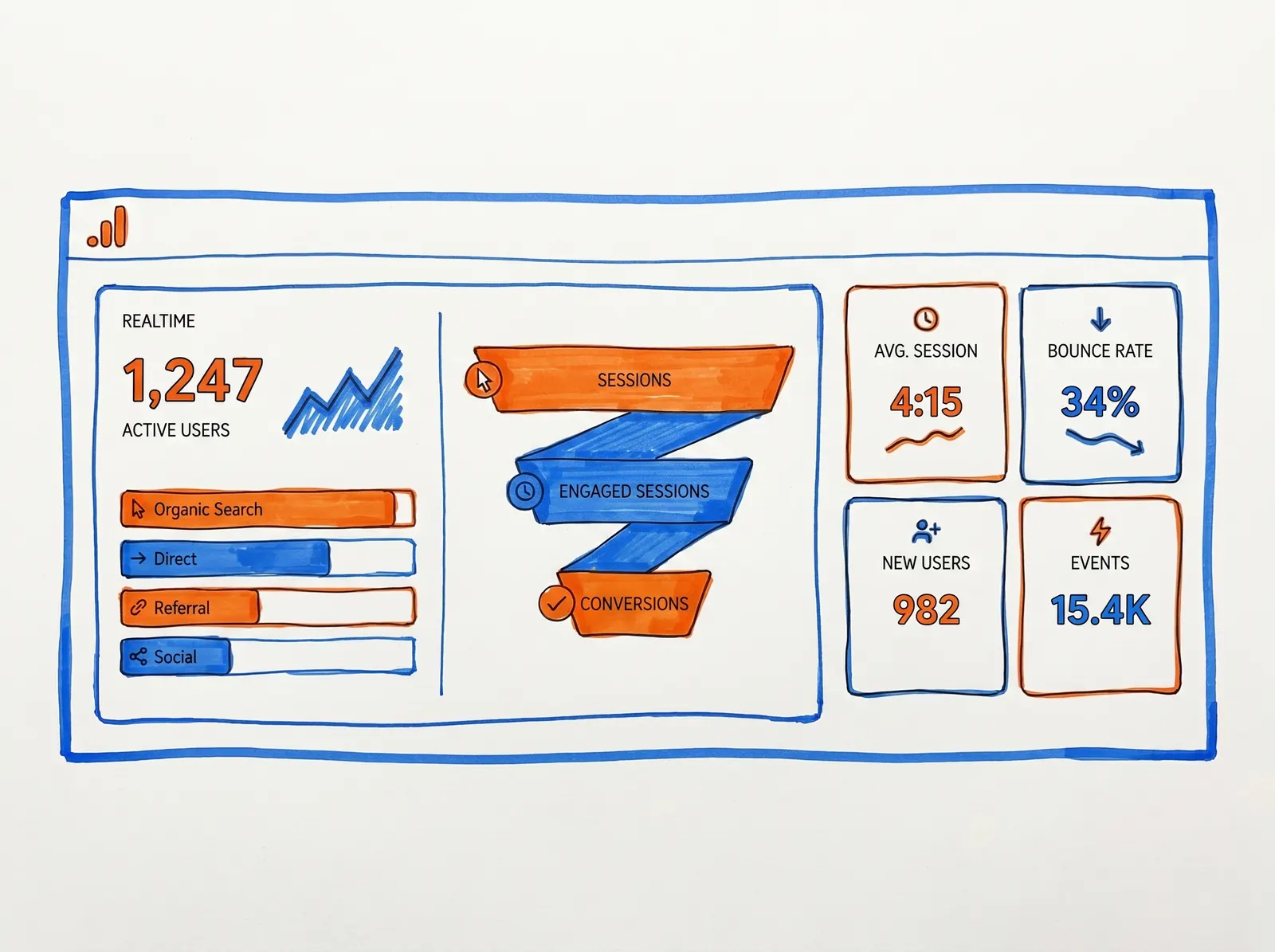
The honest catch: GA4 packs serious power, but it's not exactly welcoming for beginners. The interface can be overwhelming on first setup, and the event-based model is a real departure from the old sessions-and-pageviews logic of Universal Analytics. Google also notes in their support documentation that Realtime is a best-effort view with limited attribution and no formal SLA. Lean on it for sanity-checking installs, launches, and sudden spikes — but don't make it the basis for weekly reporting.
Google Search Console: Tracking Performance Inside Google Search
Search Console addresses a fundamentally different question than GA4. Where Analytics covers what happens after a visitor lands, Search Console covers what happens within Google Search itself before the click occurs.
Google describes Search Console as the tool that helps you measure search traffic and performance, fix issues, and improve how your site appears in results. Its performance reporting splits traffic by query, page, and country. Google's own documentation also recommends it for ownership verification, index coverage, sitemap submission, URL inspection, security checks, and Core Web Vitals monitoring.That covers a lot of ground, but the core value is straightforward. Search Console answers: "Are people even finding me on Google?"
That's a different question from "how many came?" You can hold steady traffic from email and direct bookmarks while your search visibility erodes underneath. Search Console is how you spot that drift before it turns into a cliff.
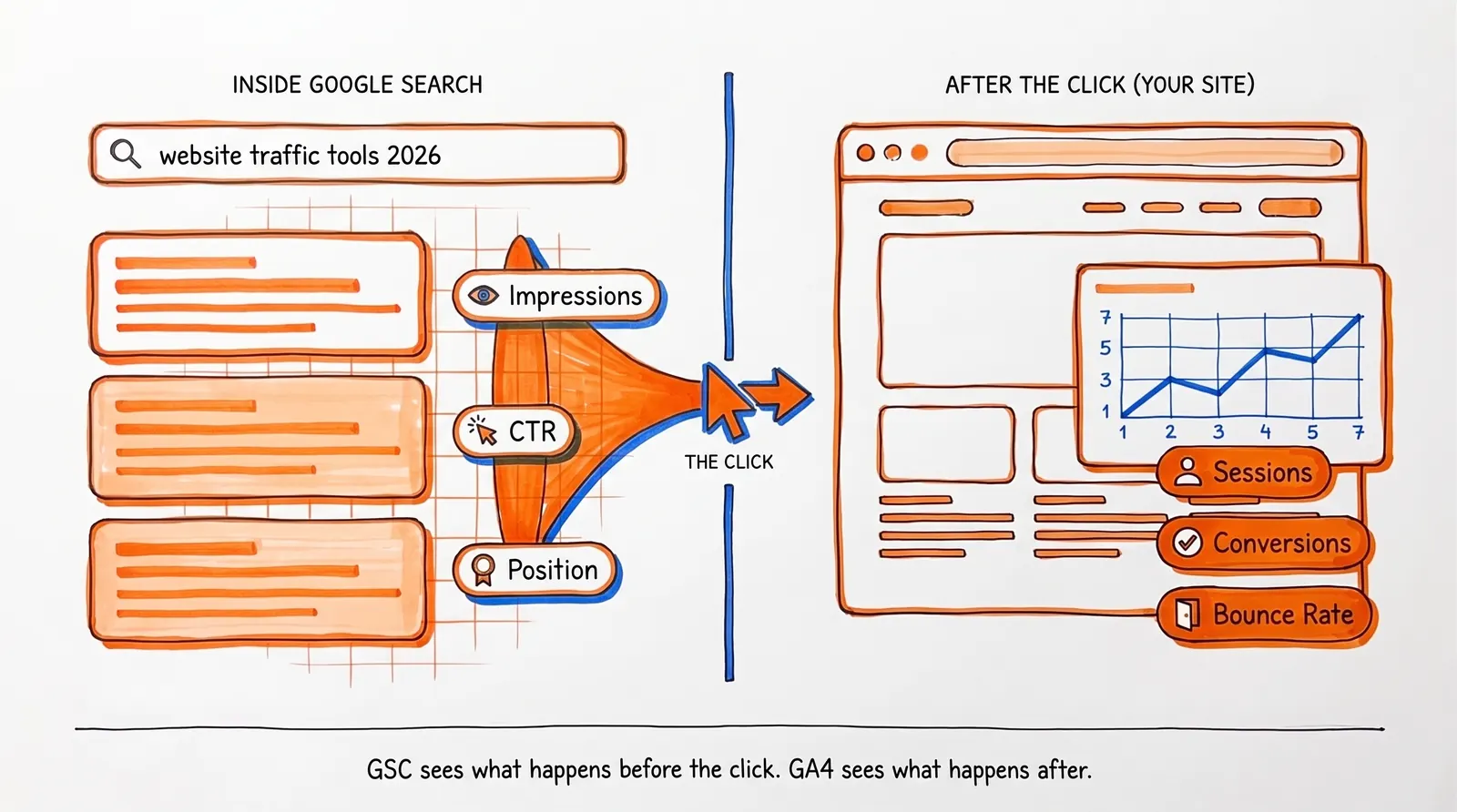
One important caveat. Search Console data inside linked Analytics reports is capped at 16 months and arrives roughly 48 hours after collection. It's invaluable for search performance, but it's not your live traffic feed. That role belongs to GA4.
A core metric Search Console exposes is click-through rate. A page sitting at position 4 with a 0.8% CTR when the industry average is 5% has a title-and-meta problem, not a ranking problem. That distinction calls for very different fixes. Search Console also flags indexing issues; if pages aren't ranking, sometimes the cause is that they aren't indexed at all. The Coverage report is your first stop when diagnosing that.
Microsoft Clarity: Free Heatmaps and Session Recordings
This is the tool that closes the gap between knowing your traffic numbers and understanding what's actually happening on the page.
Microsoft Clarity is free forever with no traffic limits. That alone is unusual. What makes it genuinely valuable, though, is what it shows you: session recordings and heatmaps that reveal where users click, how far they scroll, and exactly where they bail out. GA4 will tell you a page underperformed. Clarity helps you see why.Imagine the scenario. Your pricing page pulls 500 visits a week but generates only 3 demo requests. GA4 shows that the conversion rate is dismal. What it can't tell you is that 60% of visitors scroll past your CTA without ever laying eyes on it, or that they're tapping an image that isn't actually clickable. Clarity can.
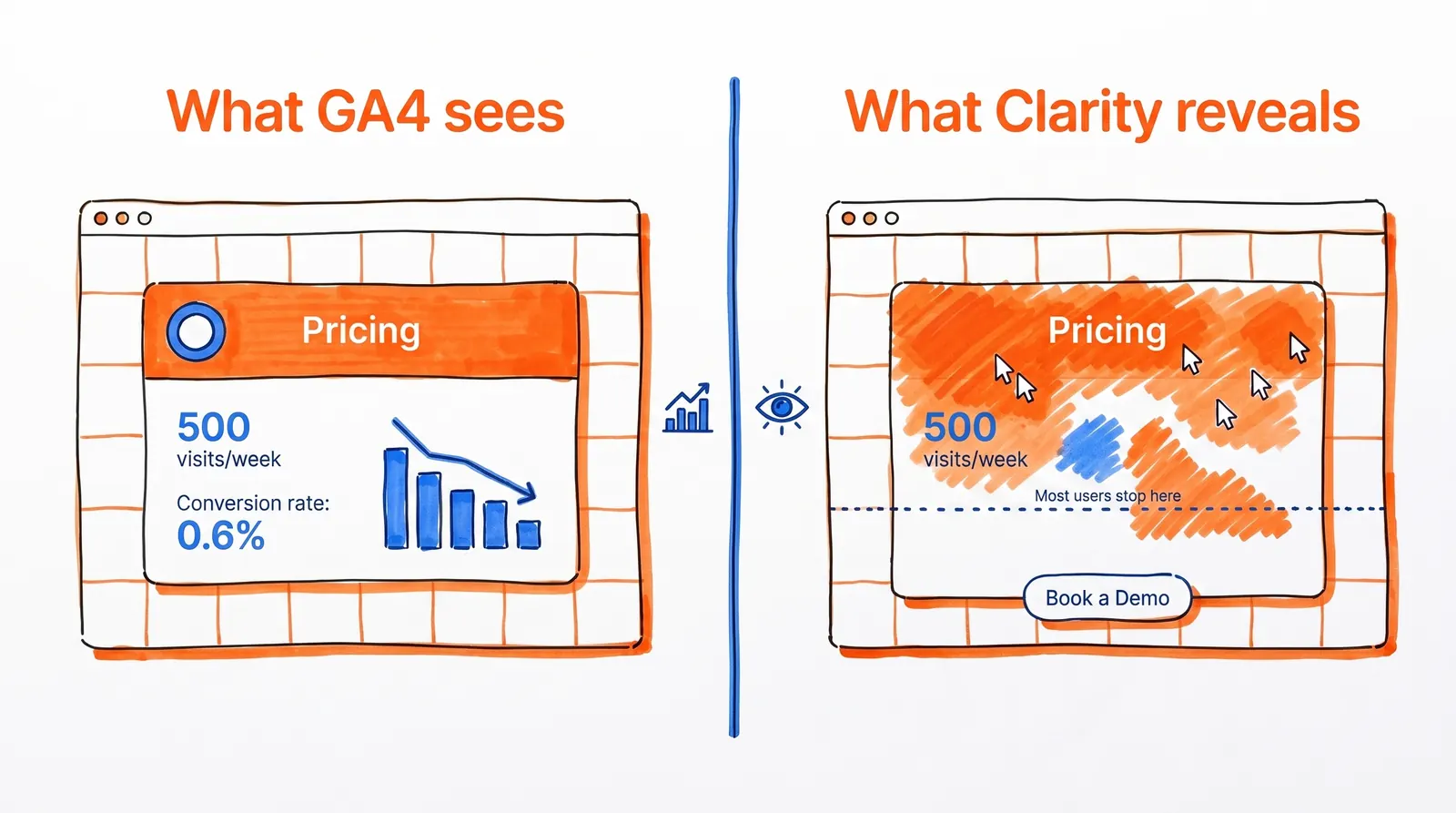
The 2026 advantage is AI traffic tracking. Microsoft added dedicated AIPlatform and PaidAIPlatform channel groups to track traffic from generative AI platforms. Newer AI Visibility features expose bot activity from supported server or CDN integrations. According to Microsoft's documentation, Clarity itself doesn't charge for AI Visibility or the Bot Activity dashboard, though enabling those integrations may incur separate server, CDN, or cloud costs.
For teams tracking referrals from ChatGPT, Perplexity, Gemini, Copilot, or Claude, that's a meaningful edge in 2026.
A practical caution: heatmaps and recordings reveal symptoms, not business outcomes by themselves. Always pair Clarity with GA4 or Search Console so you can connect behavioral observations to acquisition data and tangible results. Tying behavioral signals back to business outcomes through user behavior analysis is where most teams find the biggest payoff.
Bing Webmaster Tools: Free Search Data and IndexNow
Bing Webmaster Tools is easy to write off. Many teams treat Bing as a footnote because Google dominates search market share. But brushing it aside in 2026 is more and more of a mistake.
Microsoft describes Bing Webmaster Tools as a free collection of reports, tools, and resources for improving search performance. Its Search Performance report shows which keywords drive non-paid traffic. And the refreshed Webmaster Tools include IndexNow, which lets you ping Bing and other search engines about content updates for faster crawling.Why this matters beyond Bing search results. Bing's Webmaster Guidelines state explicitly that they cover how Bing discovers, crawls, indexes, evaluates, and surfaces content across Bing search experiences, Copilot, and the grounding API. Bing visibility can shape more AI-adjacent surfaces than teams realize when they only watch Google.
The setup cost is minimal. There's almost no downside to bringing it in early, and you gain another search data source plus quicker content discovery via IndexNow. If you're already verified in Search Console, Bing lets you import that verification directly.
Ahrefs Webmaster Tools: Free SEO Audits and Site Analytics
Ahrefs has quietly built one of the more compelling free offerings in this category. Ahrefs Webmaster Tools provides website analytics, technical audits, and SEO metrics for verified sites.
The current free limits are generous enough to be genuinely useful:
- Unlimited verified websites
- Up to 1 million web-analytics events per project per month
- 5,000 crawl credits per project per month
- Visibility into up to 1,000 backlinks and keywords at a time
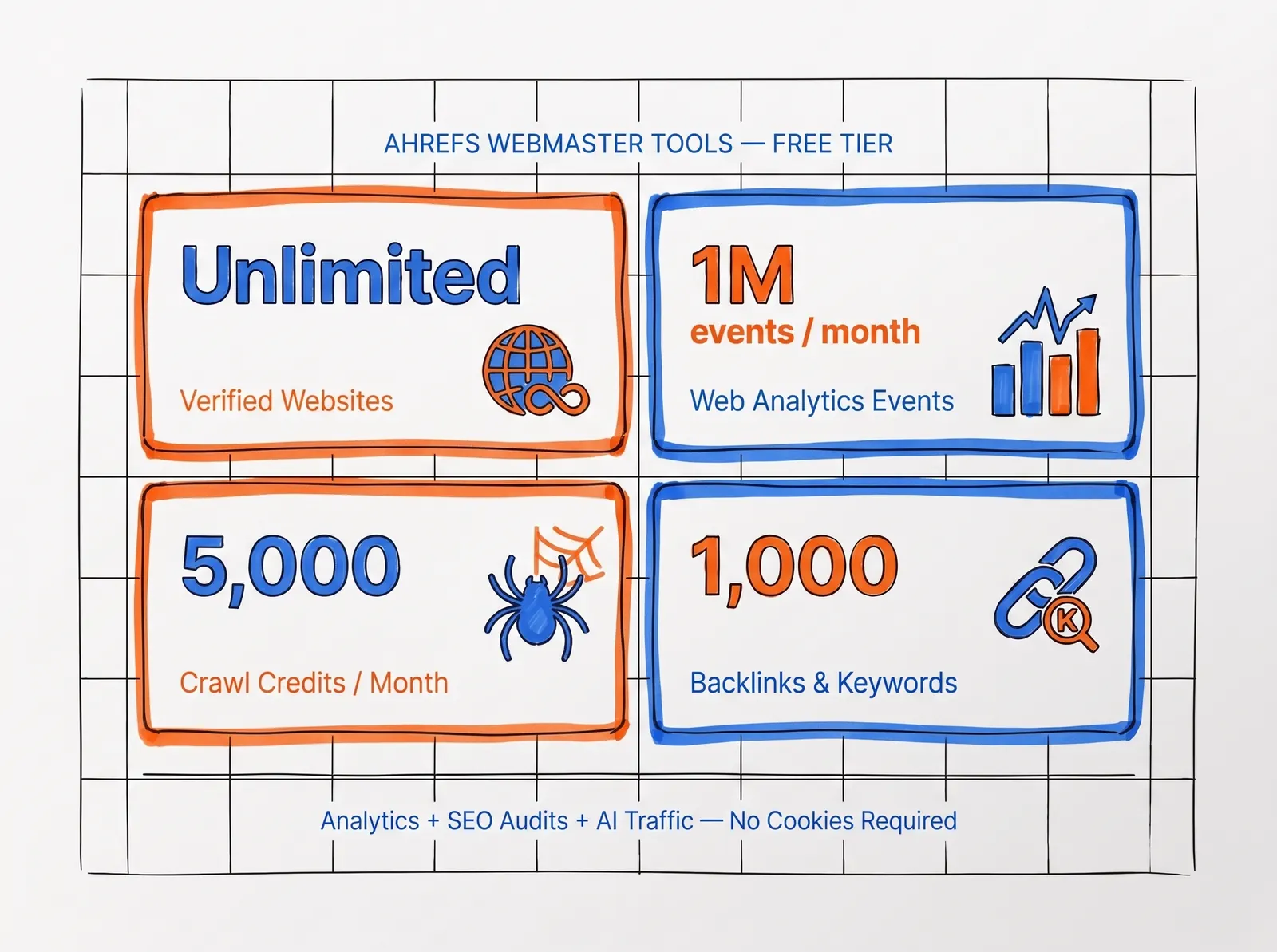
That mix — light analytics, SEO diagnostics, and AI traffic detection — makes it a smart pick for content-heavy sites that want both analytics and SEO context together, minus GA4's complexity.
The catch is straightforward: it's only for verified sites, and the free tier has clear limits. Use it as a lean alternative or a second opinion next to your primary analytics. Don't expect it to stand in for a full enterprise stack. Teams that need broader SEO tooling can dig into our breakdown of AI SEO solutions for a wider comparison.
Cloudflare Web Analytics: Free Privacy-First Traffic Monitoring
If you're after the simplest possible analytics setup that respects visitor privacy, Cloudflare Web Analytics is hard to beat.
Cloudflare's documentation describes it as free, privacy-first, requiring no DNS changes and no Cloudflare proxy. All you need is a Cloudflare account and a JavaScript snippet. It collects real user monitoring data, surfaces page views and visitor information, and according to Cloudflare, doesn't collect or use visitors' personal data.This is a strong fit for founders and marketers who care more about clean traffic monitoring and basic performance data than complex attribution models. If your need is just "how many people came, and which pages did they hit?" without juggling consent banners and cookie configuration, Cloudflare delivers that cleanly.
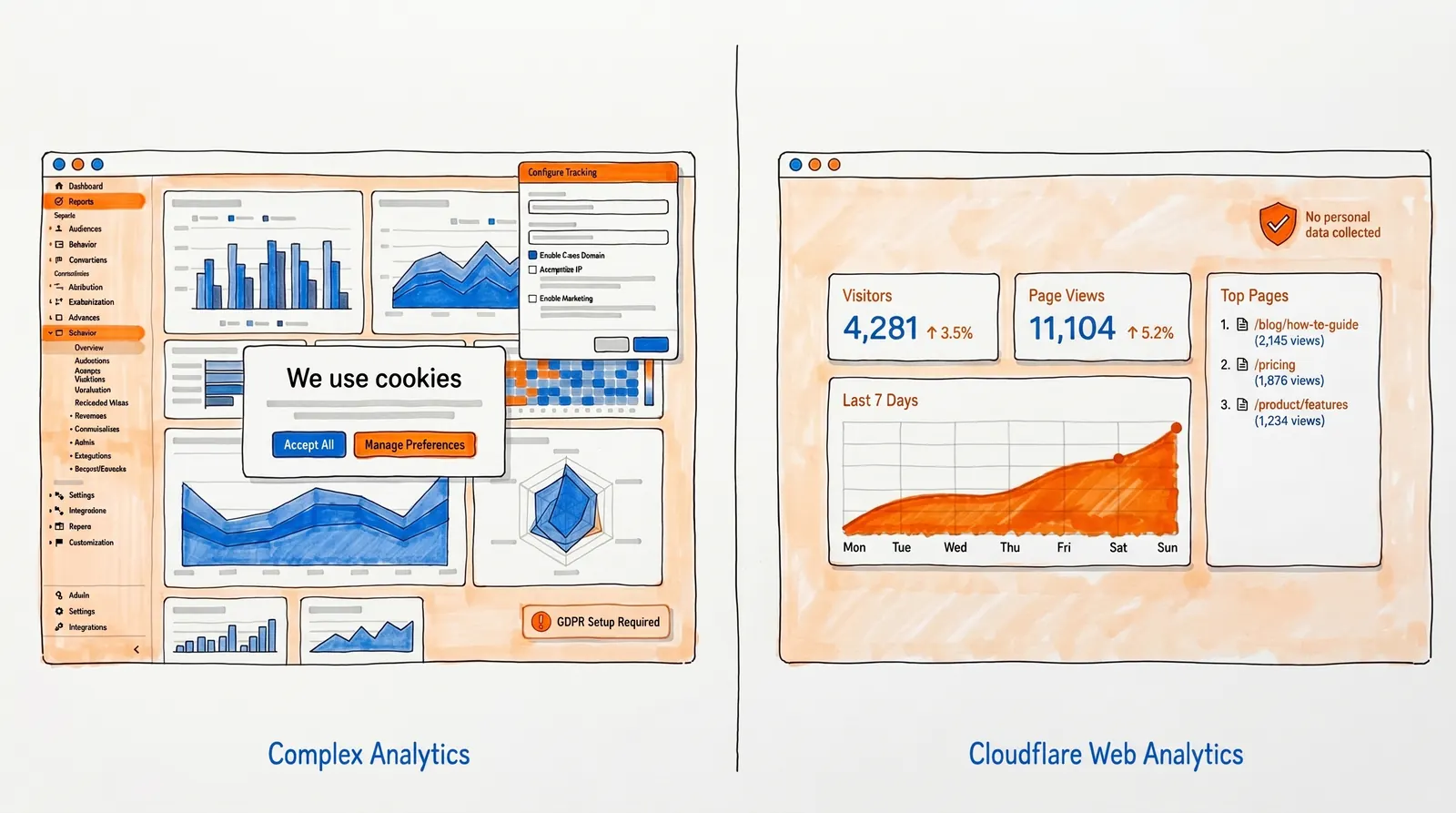
The tradeoff is depth. Cloudflare isn't trying to replace a full conversion analytics stack. It won't track custom events, funnels, or multi-touch attribution. It also has a current site limit for non-proxied properties: 10 sites on the free setup, while sites proxied through Cloudflare have no cap.
Similarweb: How to Check Competitor Website Traffic for Free
Every other tool here analyzes your own site. Similarweb flips the question: "How much traffic is my competitor pulling in?"
The Similarweb Website Traffic Checker lets you analyze traffic and engagement metrics for any domain. You can compare up to 5 competitors, see which channels drive their traffic, scout keyword opportunities, and uncover referral and traffic-gap insights.
This is invaluable for context. Knowing your site pulls 10,000 monthly visits means little in isolation. Knowing your top three rivals pull 50,000, 30,000, and 8,000 tells you exactly where you stand.
The 2026 bonus. Similarweb also offers a free AI Traffic Checker that surfaces AI traffic volumes, top prompts, top pages, and which engines (ChatGPT, Gemini, Claude, Copilot, Perplexity) are driving visits. That's useful for competitor research because it shows where AI-driven discovery is heading in your industry.
Once you have competitor traffic data in hand, analyzing competitor content is usually the next logical move. It transforms "they rank for more keywords" into a concrete list of topics to target.
Looker Studio: Combining GA4 and Search Console in One Dashboard
Looker Studio doesn't capture traffic on its own. Its job is the thing most free monitoring stacks are missing: unifying and visualizing the data you're already collecting.
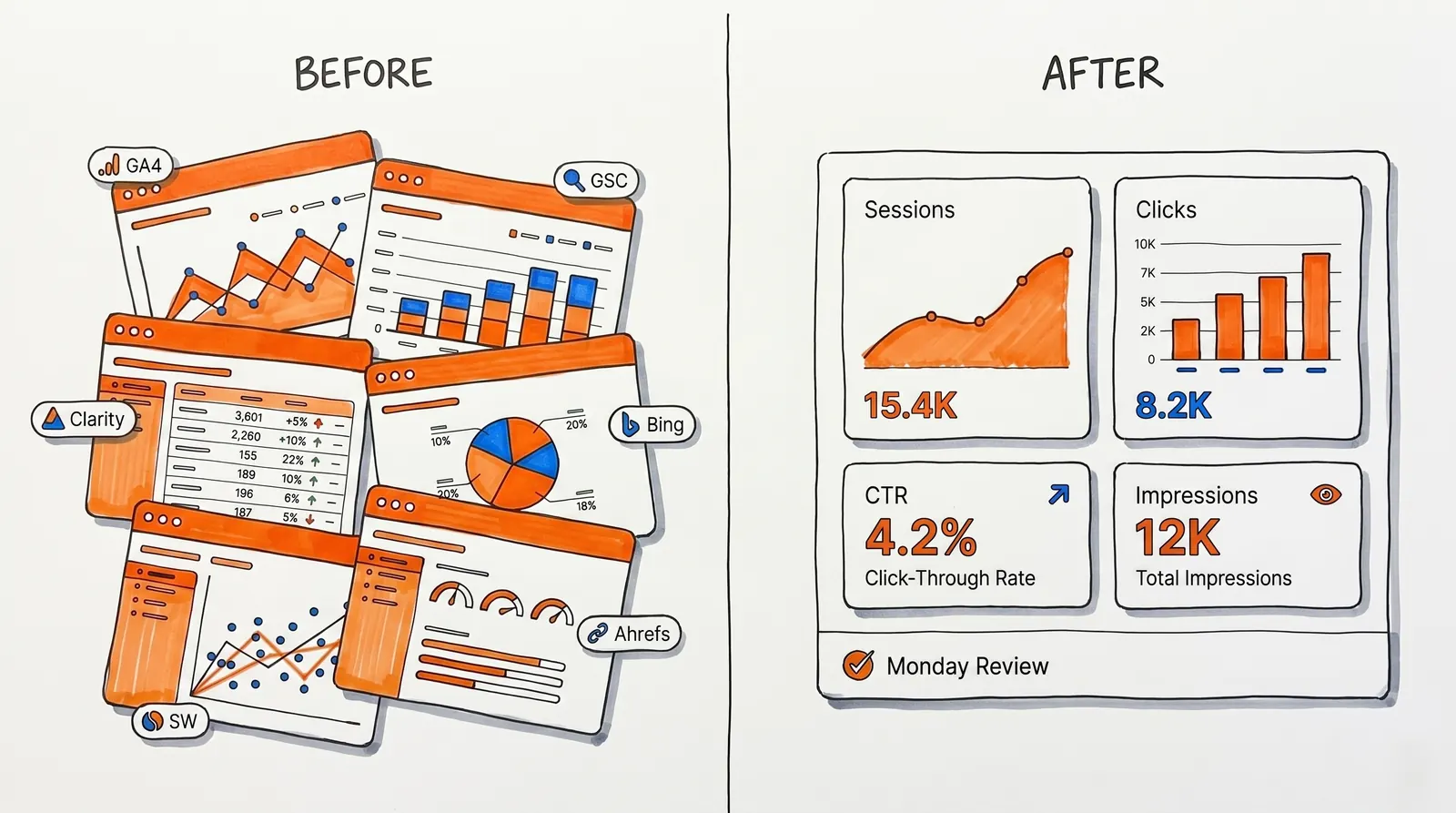
Google describes Looker Studio as easy and free, with official connectors for both Search Console and GA4. That means you can build one weekly dashboard that fuses GA4 traffic and conversions with Search Console clicks, impressions, CTR, and average position, as the Google Cloud documentation details.This is the piece that turns monitoring from a weekly scavenger hunt across six browser tabs into a single, focused review session. Build the dashboard once, check it every Monday. That habit alone will put you ahead of most teams who install analytics tools and never actually look at them on a regular cadence.
The Best Free Website Traffic Monitoring Stack for 2026
For nearly any site, the core stack shakes out like this:
| Tool | Job | Why it's in the core stack |
|---|---|---|
| GA4 | Exact traffic + conversions | First-party visitor data, event tracking, attribution |
| Google Search Console | Google search visibility | Queries, clicks, impressions, indexing health |
| Microsoft Clarity | Behavior analytics | Session recordings, heatmaps, AI traffic channels |
| Bing Webmaster Tools | Bing search + IndexNow | Second search data source, faster content discovery |
| Looker Studio | Reporting dashboard | Combines GA4 + GSC into one weekly view |
| Similarweb | Competitor benchmarking | Monthly competitor traffic estimates and trends |
That covers the five core jobs: exact traffic, search visibility, behavior analysis, competitor intelligence, and unified reporting.
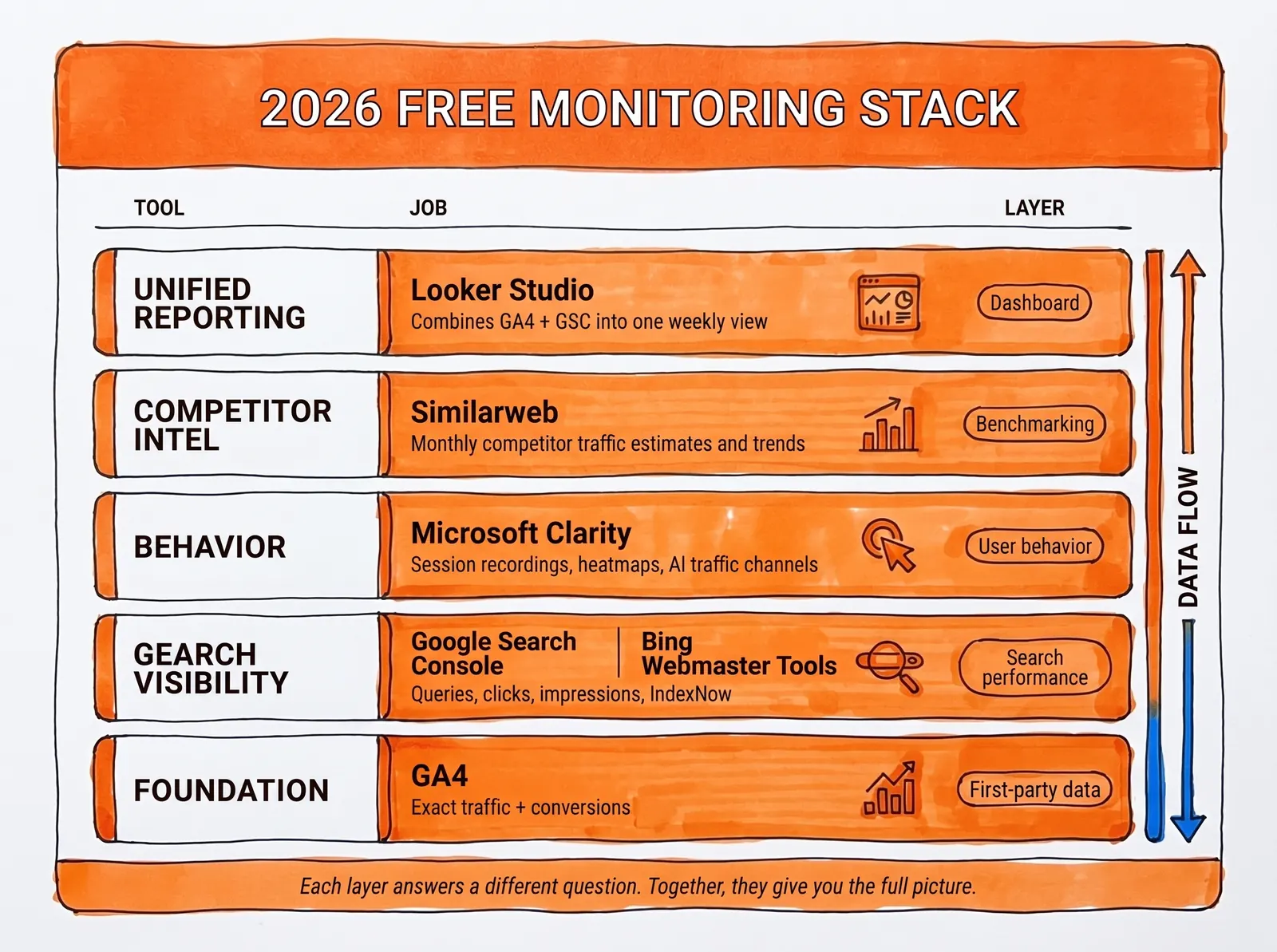
When to add more. Layer in Cloudflare Web Analytics when you want a lighter, privacy-first second view of your traffic. Add Ahrefs Web Analytics when you want simpler analytics with built-in SEO context. But add them for a real reason. More dashboards don't automatically equal more clarity.
How to Set Up Free Website Traffic Monitoring (Step by Step)
Here's the order that makes sense for most sites starting from scratch:
① Install GA4 across every page on your site.
Define the handful of events that genuinely matter to your business: demo requests, signups, purchases, form submissions, qualified leads. Don't track everything. Track what matters. Google's setup guide walks through the basics.
② Verify your site in Google Search Console.
Submit your sitemap so Google discovers new pages faster. A correctly structured XML sitemap ensures Search Console can crawl and index your pages efficiently. This gives you query-level search data that GA4 simply can't provide on its own.
③ Connect Microsoft Clarity.
This takes around five minutes and gives you a behavioral layer that pure analytics tools miss. Once visitors land on a page, recordings and heatmaps reveal whether they're confused, distracted, or blocked by layout, copy, or UX friction.
④ Set up Bing Webmaster Tools and switch on IndexNow.
Most teams ignore this until late, but there's almost no downside to bringing it in early. You gain another search data source plus quicker content discovery.
⑤ Build one Looker Studio dashboard.
Combine GA4 and Search Console using Google's native connectors. This becomes your weekly command center. Open it every Monday morning.
⑥ Save a shortlist of 3 to 5 competitors in Similarweb.
Check them monthly, not obsessively. Competitor estimates are best used for direction, not daily mood swings.
⑦ Optional: Add Cloudflare or Ahrefs Web Analytics.
If privacy-first measurement is important to you, Cloudflare gives you clean, lightweight monitoring. If you'd rather have simpler analytics with SEO context, Ahrefs is the better pick.
7 Website Traffic Metrics That Actually Matter
Opening your analytics dashboard and glancing at the visitor count is not traffic analysis. It's the equivalent of stepping on a scale once and calling it a health plan. A useful weekly review digs into seven specific signals — each one answering a question that the others can't.
- Users and sessions. The headline number. Is your audience growing, holding steady, or quietly shrinking? Watch the trend over four to eight weeks, not day-to-day noise. A single spike means nothing; a consistent climb or a slow bleed means everything.
- Traffic source breakdown. Where is growth actually coming from — organic search, direct visits, referrals, social, or paid? When organic stalls while direct ticks up, you may be building brand recognition without improving search visibility. Those are two very different situations that call for very different responses.
- Top entry pages. Most visitors never see your homepage first. They land on a blog post, a product page, or a feature overview — and your analytics will tell you exactly which ones are doing the heavy lifting. In most sites, a small handful of pages generate the majority of new sessions. Know which ones they are.
- Search clicks, impressions, CTR, and average position. A page sitting at position 5 with a 0.6% click-through rate has a different problem than a page sitting at position 12. The first needs a sharper title or meta description; the second needs more content depth or better links. Search Console separates those two problems clearly. Tightening up meta descriptions is often the quickest lever for CTR gains on pages that already rank.
- Conversions and key events. Traffic that doesn't lead anywhere measurable is just a number on a screen. Whether you're tracking demo signups, purchases, email opt-ins, or free trial starts, this is the metric that connects visibility to business value. Visits without conversion are overhead, not growth.
- On-page behavior signals. Scroll depth, rage clicks, dead clicks, and session recordings reveal friction that aggregate numbers hide. A page with a healthy visit count but a 90% bounce rate and a rage-click cluster right above your CTA has a layout problem, not a traffic problem. This is where Clarity pays for itself.
- Competitor momentum. Your own numbers only tell half the story. If a direct competitor is pulling in twice your organic traffic and publishing three times as often, that context changes how you should prioritize. Competitor estimates are directional, not precise — but directional is enough to know whether you're gaining or losing ground.
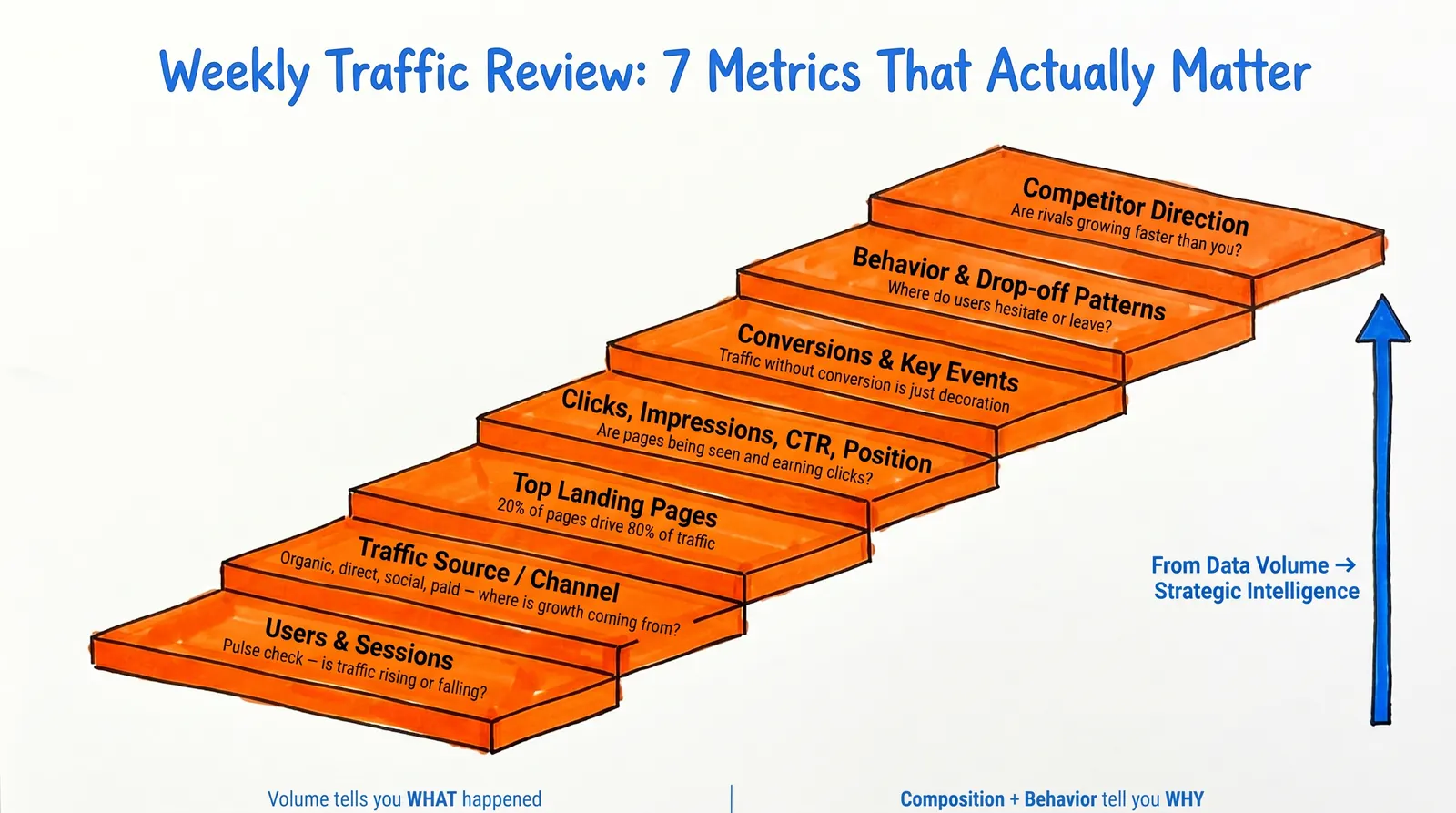
Raw volume tells you something happened. These seven metrics tell you what to do about it.
How to Monitor AI Traffic in 2026
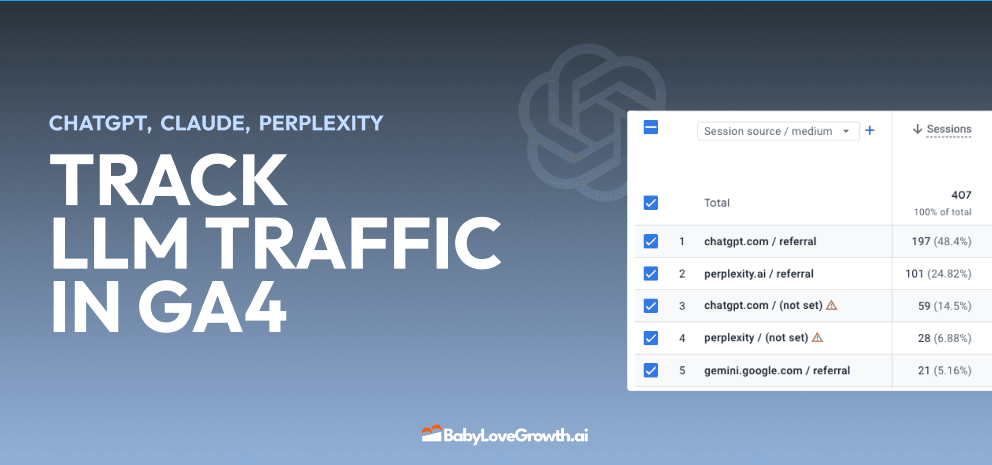
Plenty of older articles on traffic monitoring miss this entirely. In 2026, "traffic source" no longer means just search, direct, social, email, and paid. It now also includes AI referrals.
People are finding sites through ChatGPT, Perplexity, Gemini, Copilot, and Claude. And the tools are catching up. Microsoft Clarity now has AI-focused channel grouping with dedicated AIPlatform and PaidAIPlatform channels. Ahrefs says its Web Analytics can identify AI traffic from chatbots. And Similarweb offers a free AI Traffic Checker that surfaces AI visits, top prompts, and the engines driving them.
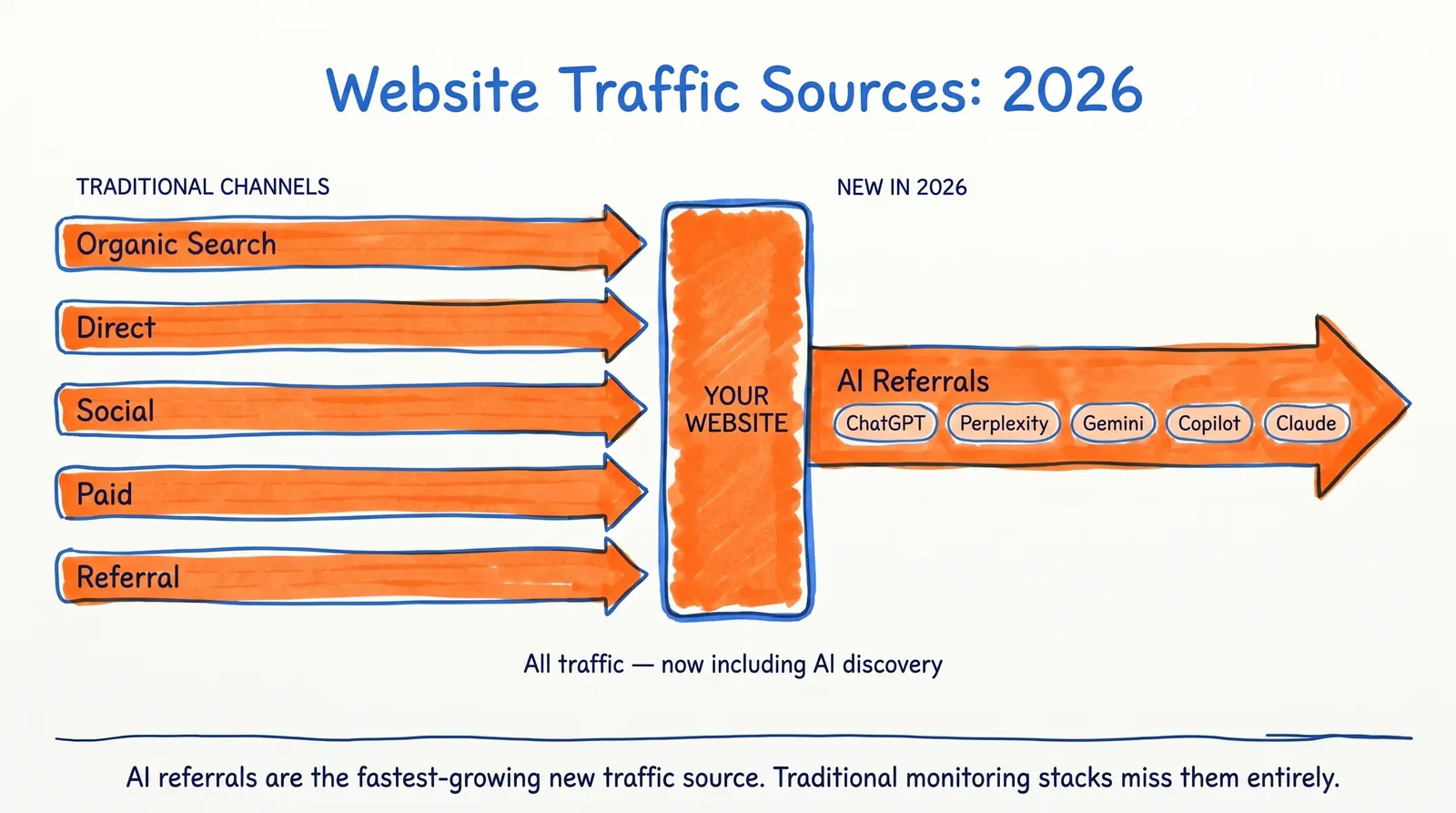
Your monitoring stack should now answer one extra question: which pages are getting discovered through AI assistants, not just classic search engines?
The reason is simple. Search rankings still matter, but the path between ranking and visit is shifting. Discovery is increasingly happening inside answer engines, assistants, and AI-driven search experiences. Teams that only watch classic search traffic will miss part of the new demand curve.
There's also a connection most monitoring guides skip: if AI assistants are pulling answers from top-ranking content, then the depth and quality of your content directly shapes whether you appear in those AI responses. Monitoring AI traffic is the diagnostic. Producing content that ranks (and gets cited by AI) is the treatment. The same quality signals matter on both fronts.
5 Website Traffic Monitoring Mistakes That Burn Time
Even with the right tools installed, plenty of teams get monitoring wrong. Here are the patterns that waste the most time:
Trying to use one tool for everything. GA4 isn't a heatmap tool. Clarity isn't a rank tracker. Similarweb isn't your competitor's internal analytics. Each tool has a specific role. Use it for that role.
Confusing exact data with modeled data. Your own site analytics are first-party and precise. Competitor traffic figures are estimates built from modeling. Both are useful. Neither should be mistaken for the other.
Watching visits but ignoring search impressions. Sometimes the actual problem isn't a traffic loss — it's a visibility loss that hasn't fully translated into a traffic drop yet. Search Console catches this before your GA4 dashboard does.
Living inside Realtime. GA4's Realtime view is useful for debugging installs and catching spikes. It's a poor stand-in for proper weekly reporting. Build the Looker Studio dashboard and check it on a schedule.
Collecting data without a review ritual.
Treat traffic data as input to content decisions, not output to admire. A solid content calendar is what closes the loop between what your dashboard shows and what gets published next.
Website Traffic Monitoring: Frequently Asked Questions
Is It Possible to Track Website Traffic Without Paying for Anything?
Absolutely. For the vast majority of small and mid-sized sites, a free stack covers everything that actually matters. Pair GA4 (on-site traffic and conversions), Search Console (Google visibility), Clarity (heatmaps and recordings), Bing Webmaster Tools (Bing search data), and Looker Studio (reporting), and you've replicated the essentials of paid platforms costing thousands per year. Google's Marketing Platform confirms GA4 is fully free, and every other tool on this list offers a genuine free tier — not a trial, not a teaser.
Which Free Tool Should I Use to Track My Own Site's Traffic?
GA4 is still the heavyweight choice for most sites. Its event-based model captures visitors, sources, page-level performance, and conversion events with depth no other free tool matches. That said, Cloudflare Web Analytics and Ahrefs Web Analytics are excellent alternatives if you'd prefer something lighter, privacy-focused, or paired with SEO data out of the box. The right choice comes down to one question: do you want power (GA4) or simplicity (Cloudflare or Ahrefs)?
Can I See How Much Traffic Competitors Are Getting?
You can — but only as an estimate. Similarweb's free traffic checker lets you look up competitor domains, compare traffic sources, and spot keyword gaps. The catch is that Similarweb's data comes from modeling and synthesized signals, not direct access to a competitor's analytics. The numbers are great for spotting trends and gauging relative scale; they're not exact figures you should quote in a board meeting.
Why Do I Need GA4 and Search Console If I Already Have One?
Because they measure two completely different things. GA4 picks up the story after someone clicks through to your site — what they did, where they came from, whether they converted. Search Console captures everything before the click — which queries surfaced your pages, how often they were seen, how often they were clicked. Skipping either leaves you blind to half the funnel. Google itself recommends connecting both, and the integration is built in.
What's the Easiest Way to Track AI Traffic in 2026?
For visitors hitting your own site, Clarity and Ahrefs Web Analytics are the two strongest free options. Clarity now ships with dedicated AI channel groups (AIPlatform and PaidAIPlatform), and Ahrefs identifies referrals from major AI assistants. For sizing up how much AI traffic your competitors are pulling in, Similarweb's free AI Traffic Checker is the easiest place to start.
How Frequently Should I Be Looking at Traffic Data?
Once a week is the right cadence for almost everyone. Set aside 30 minutes on a quiet morning, open your Looker Studio dashboard, and walk through traffic trends, search performance, conversions, and one or two behavioral patterns from Clarity. Save Similarweb competitor checks for a monthly review. Checking analytics every day is mostly an exercise in chasing noise — and it tends to lead to reactive decisions rather than considered ones.
Putting It All Together: Your Next Steps
There's no trick to monitoring website traffic well. It comes down to picking the right tools for the right jobs, installing them once, and showing up to actually look at the data on a regular schedule.
The free stack does the heavy lifting. GA4 handles your on-site numbers and conversions. Search Console and Bing Webmaster Tools cover what's happening before the click. Clarity reveals the friction points your numbers won't admit to. Similarweb keeps you honest about where you stand against the competition. And Looker Studio pulls all of it into one tidy view you'll actually open on Mondays.
The part where most teams fall short isn't installation — it's the discipline of reviewing what they collect. Build the habit of weekly check-ins, write down what you see, and let those observations shape what you publish, fix, or test next.
Monitoring will show you exactly where the opportunities and the leaks are. What it can't do is patch the leaks or chase the opportunities for you. That's where the work begins — and it's the difference between sites that just track their numbers and sites that grow them.