Video SEO guide: boost visibility and organic reach


TL;DR:
- Effective video SEO requires technical optimization, such as schema markup and crawlability, to improve Google visibility beyond platform engagement.
- Balancing semantic relevance and technical precision ensures videos are discoverable, indexed correctly, and start generating organic traffic.
You put real effort into a video, the production value is solid, and it earns thousands of views on YouTube. But when someone searches Google for exactly what your video covers, it is nowhere to be found. That gap between platform performance and search visibility is one of the most frustrating problems in visual content marketing today. The good news is the fix is not creative, it is technical and semantic. This guide walks you through exactly what it takes to surface your videos in Google search, from schema markup and crawlability to measuring real organic impact.
Table of Contents
- Understanding video SEO: Purpose and landscape
- Before you start: Essential requirements and prep
- Step-by-step: Semantic and technical video SEO optimization
- Measuring your results: Engagement, visibility, and conversions
- A fresh perspective: Why technical details trump creative effort in video SEO
- Take your video SEO further with smart tools
- Frequently asked questions
Key Takeaways
| Point | Details |
|---|---|
| Schema is vital | Proper VideoObject schema implementation makes video content discoverable by search engines. |
| Semantic context wins | Rich metadata, transcripts, and captions strengthen search indexing for your videos. |
| Technical checks first | Ensure your video files are crawlable and indexable and avoid robots.txt blocks before optimizing. |
| Track key metrics | Measure success with Google search traffic, engagement rates, and conversion data. |
| Tools accelerate results | Using AI-powered keyword and link-building tools streamlines video SEO and drives growth. |
Understanding video SEO: Purpose and landscape
Video SEO is not a single discipline. It splits into two distinct tracks, and mixing them up is a common reason optimization efforts fail to produce results.
The first track is YouTube-native SEO, which covers how your video ranks within YouTube's own search and recommendation system. That track is driven by engagement signals, watch time, keyword-rich titles, and channel authority. The second track is website video SEO, which is about getting your embedded or hosted video to appear in Google's video-rich results, often as a video carousel or rich snippet on the search results page. This guide focuses on the second track.
For embedded videos, video-driven SERPs guide makes it clear that what works on YouTube will not automatically translate to Google. The mechanics are completely different. Google cannot watch your video to understand it. Instead, Google relies heavily on surrounding context plus structured data (VideoObject schema), transcripts and captions, and technical crawl and index signals to determine whether your video is eligible for rich results.
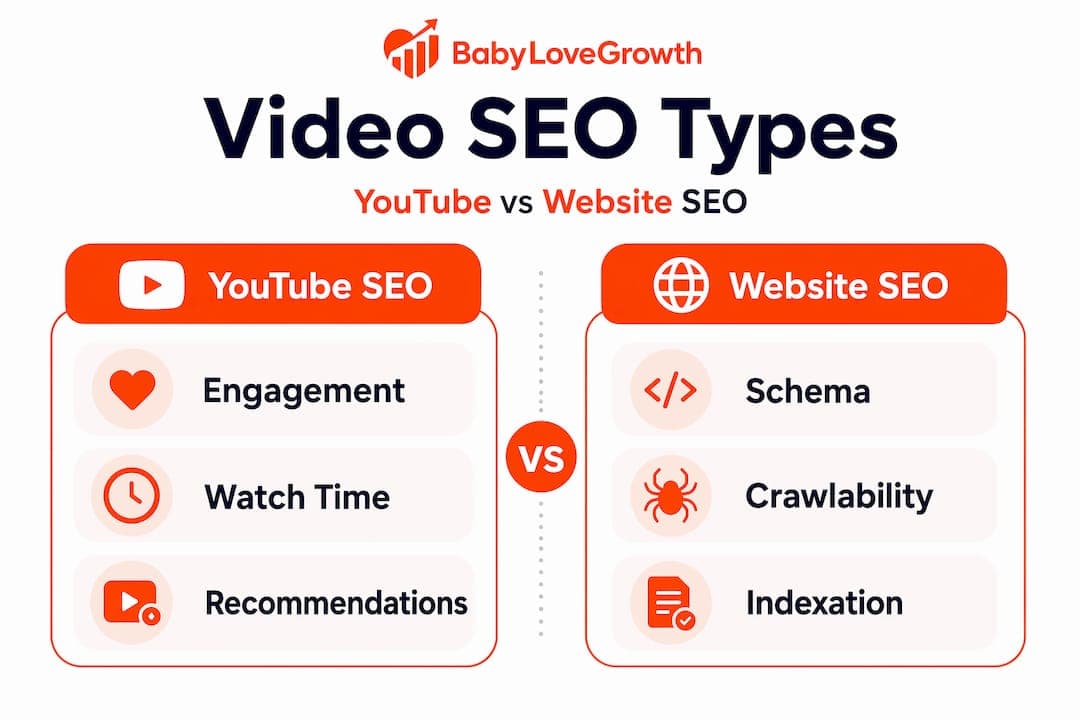
| Factor | YouTube SEO | Website video SEO |
|---|---|---|
| Primary ranking signal | Engagement and watch time | Schema markup and metadata |
| Content understanding | Algorithm watches video | Relies on text context and schema |
| Distribution target | YouTube search and recommendations | Google video-rich results |
| Crawlability requirement | None | Critical, file must be accessible |
| Transcript role | Helpful for captions | Essential for semantic indexing |
Understanding these distinctions matters because they shape every decision you make, from where you host your video to how you write your page content. The AI SEO ranking factors that govern modern search are increasingly semantic, meaning context and structure carry as much weight as the raw content itself.
Key concepts to understand before moving forward:
- Rich results eligibility: Your video must meet Google's structured data requirements to qualify for video-rich results in the SERP.
- VideoObject schema: A specific type of structured data markup that describes your video to search engines.
- Crawlability: Google's ability to access the video file or embed URL to confirm the video exists.
- Semantic relevance: The degree to which your surrounding page content reinforces the topic of your video.
"For embedded (on-site) videos, video SEO is about helping Google crawl, index, and display the page/video in video-rich results. Google relies heavily on surrounding context plus structured data (VideoObject schema), transcripts/captions, and technical crawl/index signals, not watching like humans." — Video SEO Website Optimization Guide 2026
Before you start: Essential requirements and prep
Before you touch a single line of schema markup, you need to confirm your technical foundation is solid. Skipping this step is like optimizing a landing page that is blocked from Google's index. All the effort goes nowhere.
Video SEO implementations typically center on VideoObject schema, transcripts and captions, video sitemaps, and ensuring the video files are crawlable and indexable. Each of these has specific requirements you need to satisfy before optimization delivers returns.
Here is what your pre-optimization checklist should include:
- Crawl access: Confirm your video file or embed URL is not blocked in robots.txt. Use Google Search Console's URL Inspection tool to test.
- Indexability: The page hosting the video must itself be indexable. A noindex tag kills rich result eligibility instantly.
- Video sitemap: Submit a video sitemap in Google Search Console so Google knows where your videos live.
- One video per page: Google typically shows one rich result per page. If you have multiple videos embedded, prioritize the primary one.
- Hosting stability: Your video should load reliably. Slow or broken embed URLs reduce the likelihood of indexing.
| VideoObject schema field | Required | Recommended | Impact level |
|---|---|---|---|
| name | Yes | Always | High |
| thumbnailUrl | Yes | Always | High |
| uploadDate | Yes | Always | High |
| description | No | Strongly | High |
| duration | No | Recommended | Medium |
| contentUrl or embedUrl | No | Recommended | High |
For a complete overview of how this fits into your broader publishing process, review our content workflow guide, which outlines how structured content production reduces implementation errors. You can also use our SEO content checklist to run through the full set of requirements before publishing any video-optimized page.
Your transcripts deserve particular attention. A transcript gives Google a full-text representation of your video's spoken content. Even a rough transcript is better than none. Pair it with closed captions (a .vtt or .srt file) and embed the transcript text on the page itself below the video. This is one of the highest-value, lowest-effort steps in the entire process.

Pro Tip: Use a video schema guide to generate and validate your VideoObject JSON-LD markup before publishing. Schema errors are the single most common reason videos miss rich result eligibility, and catching them early saves you hours of troubleshooting.
Plan your video SEO as part of your ongoing editorial calendar. Our content calendar SEO guide explains how to align video production with keyword research and publishing schedules so every video enters Google's index with full optimization from day one.
Step-by-step: Semantic and technical video SEO optimization
Now that your prerequisites are in place, here is how to execute the actual optimization. Think of this in two parallel tracks, semantic and technical, both running at the same time.
Dominating video-driven SERPs requires combining semantic optimization via transcripts and rich metadata with technical precision such as correct schema markup and clean crawl and index paths. You need both. One without the other underperforms.
Step 1: Implement VideoObject schema
Use JSON-LD format (Google's preferred method) and embed it in the page's "<head>` or directly in the body. Include all required fields: name, thumbnailUrl, and uploadDate. Then add the strongly recommended fields: description, duration, and either contentUrl or embedUrl.
Video schema guidance consistently emphasizes that the description field should include relevant search keywords naturally. Do not keyword-stuff it, but write a genuine description that uses the language your audience searches for.
Step 2: Validate your schema
After implementing schema, run the page through Google's Rich Results Test. Fix any errors before moving on. Common mistakes include using incorrect date formats in uploadDate (ISO 8601 is required), providing a thumbnailUrl that returns a 404, or omitting embedUrl when the video is hosted on a third-party platform.
Step 3: Build semantic context on the page
Google cannot watch your video, so the surrounding text must tell the story. Write a keyword-rich introduction above the video. Include a full transcript or a summarized version below it. Use headings and subheadings that reflect your target keywords. Treat the page as a standalone article that happens to include a video, not a page that is just a video container.
Step 4: Resolve crawl and index issues
Run a website audit checklist to surface any technical problems. Check your robots.txt specifically for rules that might block media file extensions like .mp4 or the directories where your video assets live. Confirm that the canonical tag on your page points to itself, not to another URL.
Step 5: Refresh and update regularly
Google rewards freshness. Update the transcript, description, or surrounding article content periodically. Use our SEO content update workflow to build a regular cadence of refreshing video pages so they stay competitive in search results over time.
Pro Tip: One underrated step is checking whether your thumbnail image is actually indexed. If your thumbnailUrl returns a redirect or requires authentication to access, Google cannot retrieve it and your video becomes ineligible for rich results. Always use a direct, publicly accessible image URL.
A common pitfall worth highlighting specifically: duplicate metadata. If you have the same video embedded on multiple pages, each page should have unique schema markup with distinct descriptions and titles. Identical schema across multiple URLs triggers quality issues and reduces the chance any single page earns a rich result.
Pages with video rich results see significantly higher CTR than standard text results because the visual thumbnail stands out in the SERP. That alone makes schema implementation one of the highest-ROI technical SEO tasks you can execute.
Measuring your results: Engagement, visibility, and conversions
Optimization without measurement is guesswork. Once your video pages are live and indexed, you need a clear picture of what is working and where to push harder.
Video SEO success measurement typically includes engagement and visibility beyond YouTube, specifically tracking traffic from Google search and conversions driven by embedded video CTAs. This is a different measurement mindset than what most YouTube marketers are used to.Metrics that matter for website video SEO:
- Google Search traffic to video pages: Track this in Google Analytics by filtering sessions by page and comparing to organic search as the source.
- Impressions and clicks in Google Search Console: Look specifically under the "Videos" filter in the Performance report to see which queries are surfacing your videos.
- Average watch time and retention: Use your video platform's analytics to see how much of each video users actually watch. Low retention on a page suggests the video is not matching search intent.
- Click-through rate (CTR) from the SERP: A rich result with a thumbnail should yield higher CTR. If CTR is low, your title and description in schema may need revision.
- CTA conversion rate: Track how many viewers who watch your embedded video take the desired next step, whether that is signing up, downloading, or visiting another page.
| Metric | What it tells you | How to improve |
|---|---|---|
| Organic impressions (video filter) | Schema is working and triggering rich results | Expand keyword targeting in metadata |
| CTR from video rich results | Thumbnail and title quality | Revise thumbnailUrl and schema name field |
| Bounce rate on video pages | Page relevance and content depth | Add transcripts, expand surrounding text |
| Watch time | Video content quality and intent match | Revise video intro, improve hook |
| CTA conversions | Page-to-lead effectiveness | Reposition CTA, test copy |
Set up a monthly review cadence. Check Search Console for new queries your videos are surfacing for, then expand your schema metadata and on-page content to cover those topics more explicitly. This is how you turn a single optimized video into a growing source of organic traffic over time.
For a deeper look at how to interpret organic data, our guide on how to measure SEO performance covers the full reporting framework we recommend for ongoing SEO programs.
A fresh perspective: Why technical details trump creative effort in video SEO
Here is something that takes most marketers by surprise when they first experience it: a meticulously produced video with professional editing, great lighting, and genuine value can be completely invisible in Google search, while a simple screen recording with correct schema markup earns a rich result on page one.
That is not an exaggeration. It is what the data actually shows. Incorrect or missing VideoObject schema, non-crawlable video files, and schema testing gaps can prevent videos from appearing in rich results even when the video is embedded directly on the page. The video exists. Google just cannot confirm it, so it gets excluded.
The discomfort for most content teams is that this means technical execution outranks creative quality in determining search visibility. You can make the best video in your niche, but if your robots.txt blocks the video file directory or your thumbnailUrl returns a 404, you get nothing. A mediocre video with clean schema, a crawlable file, and a well-structured transcript will consistently outperform it.
This does not mean creative quality is irrelevant. It absolutely matters for retention, sharing, and brand perception. But for organic search visibility specifically, the checklist-driven technical work is what moves the needle. Creative effort earns engagement once users arrive. Technical precision determines whether they find you at all.
The practical lesson is that video SEO should be owned by someone who thinks in checklists, not just in content. Your search engine ranking insights depend less on how polished your video looks and more on whether a bot can confirm it exists and understand what it is about.
Build the technical rigor first. Let creative quality handle the rest.
Take your video SEO further with smart tools
Getting video SEO right requires more than a one-time optimization pass. It demands ongoing keyword intelligence, content planning, and authority building across every video-rich page on your site.
Babylovegrowth.ai gives you the automation layer that keeps your video SEO compounding over time. Use our keyword discovery tool to find the exact queries that trigger video-rich results in your niche, including terms your competitors are missing. Our keyword research tool maps those keywords to content gaps across your video library so every new video launches with an optimized page behind it. And because video-rich pages need authority to compete, our backlink building software helps you earn the external links that push your video pages up in organic rankings. Smarter tools mean faster, more durable results.
Frequently asked questions
What is the difference between YouTube SEO and website video SEO?
YouTube SEO focuses on optimizing uploads for YouTube's ranking algorithm using engagement signals, while website video SEO targets video-rich results within Google search by leveraging schema, context, and crawlability.
How can I tell if Google is indexing my embedded videos?
Check the Videos performance report in Google Search Console and inspect your schema markup with a validation tool; also confirm that your video files are crawlable and not blocked by robots.txt.
What are the most common reasons videos don't show up in Google search?
The most frequent causes are missing or incorrect VideoObject schema, robots.txt blockage of video assets, and gaps in transcript or metadata, all of which can prevent rich result eligibility even when the video is embedded on the page.
Which metrics best measure the impact of video SEO?
Track Google search traffic to video pages, SERP impressions using the video filter in Search Console, average watch time, CTR, and conversions from embedded CTAs to get a complete picture of video SEO performance.
Do transcripts and captions really boost video SEO?
Yes. Transcripts and captions provide the semantic context that Google relies on heavily to understand and index video content, making them one of the most impactful, lowest-cost optimizations you can make.