User Feedback Incorporation for SEO Success


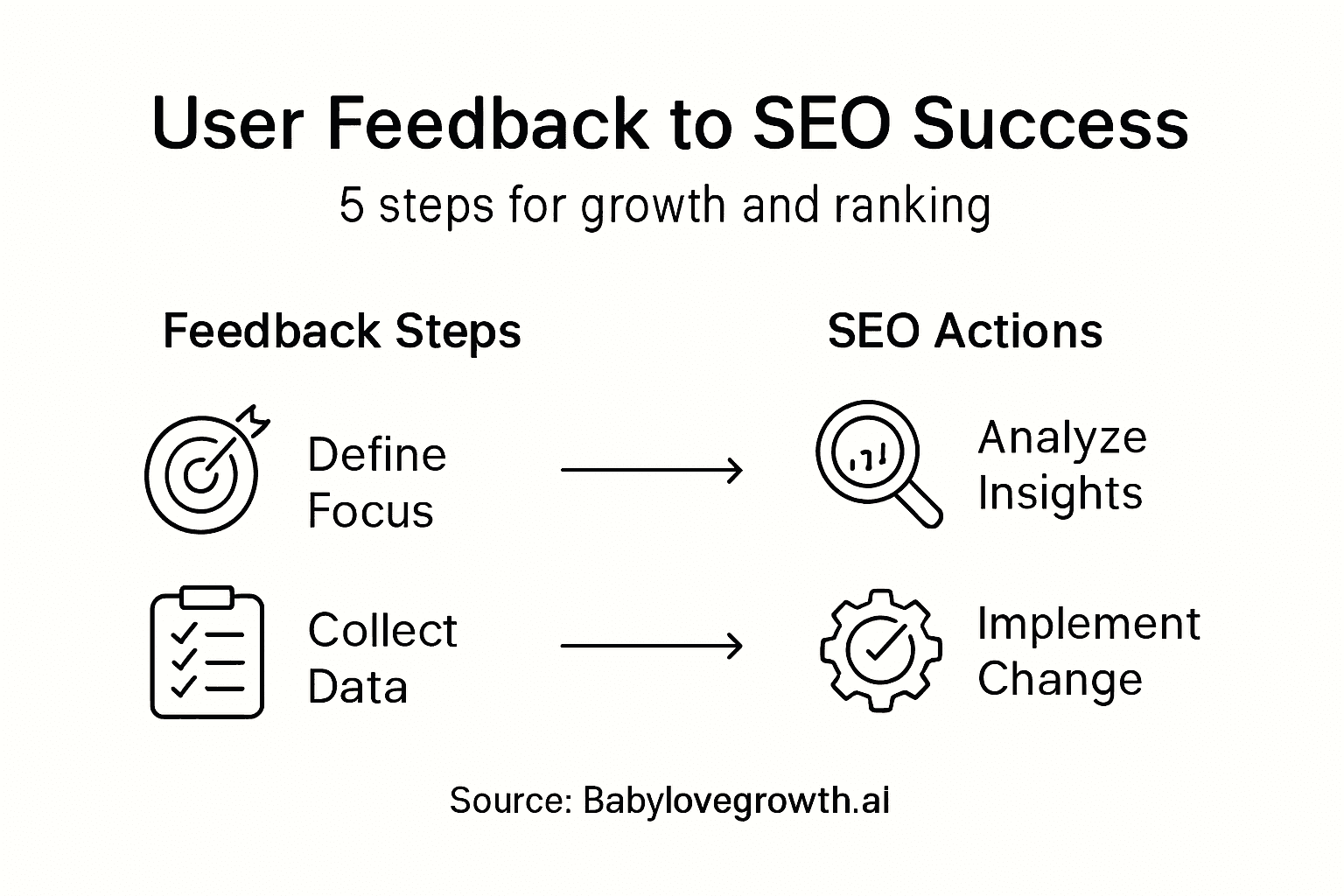
Finding the signal in all your user feedback can sometimes feel overwhelming if you do not know exactly what you are aiming to achieve. For Canadian and American e-commerce teams, building SEO strategies based on customer input means sorting real insights from noise right from the start. By focusing on defining user feedback objectives, you set a clear path that connects every customer comment to measurable business improvements, making your efforts focused and actionable.
Table of Contents
- Step 1: Define User Feedback Objectives
- Step 2: Collect Actionable Feedback Systematically
- Step 3: Analyze Data To Uncover Key Insights
- Step 4: Integrate User Feedback Into SEO Strategy
- Step 5: Verify Improvements Through Performance Monitoring
Quick Summary
| Key Insight | Explanation |
|---|---|
| 1. Define clear feedback objectives | Establish specific goals related to your business problems to guide your feedback collection process effectively. |
| 2. Use mixed feedback collection methods | Combine proactive surveys and reactive inputs for comprehensive insights into user behavior and pain points. |
| 3. Analyze data for actionable insights | Organize and group feedback into themes to identify patterns relevant to your SEO and conversion goals. |
| 4. Integrate feedback into SEO strategy | Use user insights to inform and optimize your site's SEO, improving user experience and search visibility. |
| 5. Monitor performance for verification | Track key performance metrics to confirm the effectiveness of changes made based on user feedback. |
Step 1: Define user feedback objectives
Before you start collecting feedback from your customers, you need to know exactly what you're looking for. Defining clear objectives is the difference between gathering useful data that drives your SEO strategy forward and collecting noise that sits unused in a spreadsheet. This step sets the foundation for everything that follows, so let's get it right.
Start by connecting your feedback goals to your business outcomes. Ask yourself what specific problems you're trying to solve with user feedback. Are you seeing bounce rates spike on certain product pages? Do customers mention confusing navigation in support emails? Are you losing sales at the checkout step? Your objectives should directly address these pain points. User feedback guides what data to collect, whether that's improving user experience, identifying where customers struggle, or finding which changes will have the biggest impact on your conversion rates. For an e-commerce business, this might mean collecting feedback specifically about product descriptions, search functionality, or the checkout process because these directly affect your bottom line and your search rankings.
Next, think about your digital channels and what each one can tell you. Your website visitors, email subscribers, and social media followers will provide different types of feedback. Someone leaving a review on your product page gives you SEO-rich data you can use for optimization. A customer responding to a survey email might tell you about pain points that aren't visible in your search behavior. Define which channels align with your goals and what specific questions each channel should answer. Are you trying to validate keyword strategy? Understand product page clarity? Find content gaps your competitors are exploiting? Make this connection explicit. Setting these goals upfront ensures your feedback collection stays focused and relevant, rather than becoming a scattered exercise in asking too many people too many things.
Pro tip: Write down your three biggest business challenges this quarter, then map each one to a specific feedback objective—this keeps your efforts aligned with revenue impact rather than collecting feedback for its own sake.
Step 2: Collect actionable feedback systematically
Now that you know what you're looking for, it's time to actually gather the feedback. The key is using a combination of methods that capture both what users tell you directly and what their behavior shows you. This two pronged approach gives you a complete picture instead of relying on just one data source.
Start by mixing proactive and reactive feedback collection. Proactive methods mean you're actively asking for feedback. Deploy surveys on your website asking specific questions about product clarity or checkout experience. Use feedback widgets that pop up after users complete an action, like finishing a purchase or viewing a product page. Schedule quick user interviews with your most engaged customers or your churned ones. On the flip side, reactive feedback comes from unsolicited user input like customer reviews, support ticket comments, and social media mentions. Your customers are already telling you things in these channels; you just need to listen systematically. Track which pages generate the most negative comments. Note which product reviews mention navigation confusion or unclear descriptions. This combination ensures you capture both the feedback users know they want to give you and the concerns they mention offhand.
Collect feedback consistently across multiple touchpoints rather than running one big survey and calling it done. Your website visitors might give you different feedback than email subscribers. People reviewing you on Google might highlight issues your surveys never surface. Use active methods like structured surveys targeting specific SEO goals, then layer in passive feedback from analytics, heatmaps, and user session recordings. Set up a regular rhythm for collection, whether that's weekly surveys, monthly customer calls, or continuous monitoring of review sites. The more consistently you gather data, the more reliable patterns emerge. When you spot the same complaint appearing in three different channels, you know it's worth fixing. This systematic approach helps you prioritize changes based on actual user needs and business impact rather than just the loudest single complaint.
Pro tip: Set up a simple spreadsheet or Airtable that captures feedback source, topic, and frequency so you can spot patterns quickly instead of letting valuable insights scatter across different tools and platforms.
Here's a comparison of proactive vs. reactive user feedback collection methods and their unique business advantages:
| Method Type | Example Channels | Data Captured | Business Advantage |
|---|---|---|---|
| Proactive | Surveys, on-site polls | Targeted problem insights | Directly addresses current issues |
| Reactive | Reviews, support emails | Unsolicited pain points | Reveals unexpected user concerns |
| Combined | Surveys + reviews | Both structured and organic | Offers holistic view for strategy |
Step 3: Analyze data to uncover key insights
You now have feedback data coming in from multiple sources. The challenge is turning that raw feedback into insights that actually drive your SEO strategy forward. Analysis is where scattered comments and survey responses become concrete directions for improving your website and content.
Start by organizing your feedback around your original objectives. Pull together all the comments, survey responses, and user behavior data you collected. Group similar feedback into themes. Maybe you're seeing repeated complaints about slow product page load times, or customers consistently mention they can't find filter options easily. Look for patterns that appear across multiple feedback sources. When the same issue shows up in customer emails, support tickets, and Google reviews, you know it matters. Then connect these patterns directly back to your SEO and conversion goals. Translating feedback into actionable improvements requires connecting user input to requirements validation, meaning you verify that fixing these issues will actually solve real user problems and impact your business metrics. A complaint about unclear product descriptions isn't just a user experience problem; it's also an SEO opportunity. Vague descriptions rank poorly and confuse both search engines and potential customers. When you uncover this pattern through feedback analysis, you now have evidence to justify rewriting those descriptions with keyword optimization in mind.

Use a simple framework to prioritize what to fix first. Rate each insight on impact and effort. High impact insights that come from multiple feedback sources and directly affect conversions or rankings should move to the top of your list. Lower effort fixes that yield quick wins should also get attention early. When analyzing feedback about checkout friction, for instance, using analytics data alongside customer feedback helps you see exactly where people drop off. You might discover that 40 percent of users abandon carts on the shipping options page. Combine that quantitative data with qualitative feedback explaining why they're leaving, and you have a clear roadmap for improvement. This evidence-based approach keeps your team aligned on priorities and prevents arguments about which problems to tackle first.
Pro tip: Create a simple scoring system that multiplies feedback frequency by estimated business impact, then rank your insights by score; this removes emotion from prioritization and keeps your team focused on changes that matter most to your bottom line.
Step 4: Integrate user feedback into SEO strategy
Your insights are now clear. The final step is translating those findings into concrete changes that improve both user experience and search visibility. This is where user feedback stops being interesting data and starts becoming revenue driving action.
Begin by mapping feedback insights to specific SEO opportunities. If users repeatedly mention they can't find products by color or size, that's telling you to optimize your site architecture and add better filtering options. But it's also an SEO signal. Those missing filters probably mean users are leaving your site to search elsewhere, increasing your bounce rate and hurting your rankings. When you implement structured filtering, you're simultaneously fixing a user problem and sending search engines clearer signals about your content organization. Look at product pages where feedback highlights confusion about features or benefits. Rewrite those pages with more specific, searchable language. Use the actual words customers mentioned in their feedback. If they said "I couldn't tell if this works with my device," that phrase probably matches search queries they're using. By incorporating user language into your content, you improve both clarity and keyword relevance. Effective SEO content strategy starts with understanding what your audience actually needs and searches for, and user feedback gives you that understanding directly.
Next, prioritize feedback driven improvements based on potential search impact and conversion value. Some fixes will improve both simultaneously. Poor navigation hurts both rankings and user experience. Unclear product descriptions confuse search engines and lose sales. Other fixes might only impact one area, so weight them accordingly. Create a quarterly roadmap where you tackle the highest impact feedback items alongside your regular SEO efforts. Don't treat feedback incorporation as a separate project. Weave it into your content updates, technical improvements, and site architecture changes. When you're refreshing old blog posts for better rankings, incorporate user feedback about what information was missing. When you're redesigning product pages, use feedback about what customers struggled to understand. This integrated approach means every improvement serves multiple purposes. Track which feedback driven changes actually moved the needle on rankings, traffic, and conversions so you can keep doing what works.
Pro tip: Create a simple tracking sheet that shows each feedback insight, the changes you made, and the metrics that improved, then review it monthly to identify which types of feedback drive your biggest wins.
Step 5: Verify improvements through performance monitoring
You've made changes based on user feedback. Now you need to confirm those changes actually delivered the results you expected. Monitoring performance tells you what's working, what needs adjustment, and whether your feedback driven strategy is genuinely moving your business forward.
Start tracking the specific metrics that connect to your original feedback and objectives. If feedback revealed that users couldn't find products, monitor whether your new filtering system reduced bounce rates and increased pages per session. If customers complained about unclear product descriptions, track whether organic traffic to those pages increased and whether conversion rates improved. Set up before and after comparisons so you can clearly see the impact. Use Google Analytics to monitor organic traffic trends on updated pages. Watch your rankings for keywords tied to the feedback you addressed. If user feedback highlighted that people search for "best running shoes for flat feet" but couldn't find relevant information, track whether your new content targeting that phrase improves your rankings and drives qualified traffic. This direct correlation between feedback, changes, and metrics proves the value of your user-centric approach and builds support for continuing the practice.
Monitor both quantitative metrics and qualitative user response. Check your ongoing feedback channels for mentions of the changes you made. Are customers still complaining about the same issues, or has the tone shifted? If you fixed navigation confusion, watch for reduced support tickets about finding products. If you improved checkout clarity, look for fewer abandoned carts with questions about shipping costs. Set a monitoring cadence of at least monthly reviews so you catch problems quickly and can iterate. Some changes might not work as expected. Maybe your new product page layout confused people more than it helped. The data will show you this within weeks, not months. The feedback loop doesn't end once you make changes. It becomes continuous. New feedback comes in, you analyze it, you make improvements, you monitor results, and you start over with a deeper understanding of what works for your specific audience.
Pro tip: Set up automated weekly reports showing key metrics like organic traffic, bounce rate, and conversion rate for your feedback-driven changes so you can spot trends quickly without manual digging through analytics each time.
Summarize how performance metrics validate feedback-driven SEO improvements:
| Metric Tracked | Change Expected | SEO/Business Benefit |
|---|---|---|
| Bounce Rate | Decrease after fixes | Higher user retention |
| Organic Traffic | Increase on optimized pages | Improved rankings and reach |
| Conversion Rate | Higher after improvements | More sales, revenue growth |
| User Complaints | Fewer support tickets | Enhanced customer satisfaction |
Unlock SEO Success by Turning User Feedback Into Growth
The article highlights the challenge of systematically incorporating user feedback into your SEO strategy to boost organic traffic and conversion rates. If you struggle with identifying actionable insights from customer comments or integrating those insights into content and site improvements, you are not alone. Common pain points include unclear product descriptions, confusing navigation, and missed keyword opportunities — all of which directly affect both user experience and search rankings.
At Babylovegrowth.ai, we understand that transforming scattered feedback into effective SEO actions requires AI-powered automation and a clear roadmap. Our platform simplifies this process by offering a step-by-step method that helps you analyze user input, optimize content with targeted keywords, and improve site structure automatically. With our 30-day personalized content plan and backlink exchange ecosystem, you get more than just insights — you get measurable improvements that drive real results for business owners and marketers.
Ready to stop guessing and start growing your organic traffic by leveraging what your users are telling you?
Experience how integrating user feedback into your SEO can be effortless. Visit Babylovegrowth.ai to start your free trial today and see how AI-generated content and backlink strategies work together to improve your rankings and conversions fast.
Frequently Asked Questions
How can I define user feedback objectives for SEO improvements?
To define user feedback objectives for SEO improvements, connect your feedback goals directly to specific business outcomes. Identify pain points like high bounce rates or unclear product descriptions, and focus your feedback collection on addressing these issues to enhance user experience and boost search rankings.
What methods should I use to collect user feedback systematically?
To collect user feedback systematically, use a mix of proactive and reactive methods. Deploy targeted surveys on your website and monitor unsolicited feedback from reviews and social media to gather insights consistently and holistically.
How can I analyze collected feedback effectively?
You can analyze collected feedback by organizing it around your initial objectives and identifying common themes. Group similar comments together, look for recurring issues, and prioritize them based on potential impact on your SEO and conversion rates for actionable insights.
What steps should I take to integrate user feedback into my SEO strategy?
To integrate user feedback into your SEO strategy, map insights to specific SEO opportunities and prioritize improvements based on their potential impact. Implement changes that solve user problems while optimizing for relevant keywords to enhance both user experience and search visibility.
How can I verify if my changes based on user feedback are effective?
You can verify the effectiveness of your changes by tracking key performance metrics such as bounce rates, organic traffic, and conversion rates. Monitor these metrics regularly, ideally monthly, to identify trends and ensure your feedback-driven modifications are yielding positive results.